Skip to content
AC POS
E-invoicing Compliant with the e-invoicing requirements — Phase Two (Integration) See how the system does it

A till and full accounting in one system Unlimited branches, no per-user fees, and Phase Two e-invoicing.

Every sale posts its own journal entry as it happens, so the balance sheet and the income statement come out of the same system — no manual re-keying, no second accounting package.

Runs in the browser on desktop, tablet and phone, and needs an internet connection.

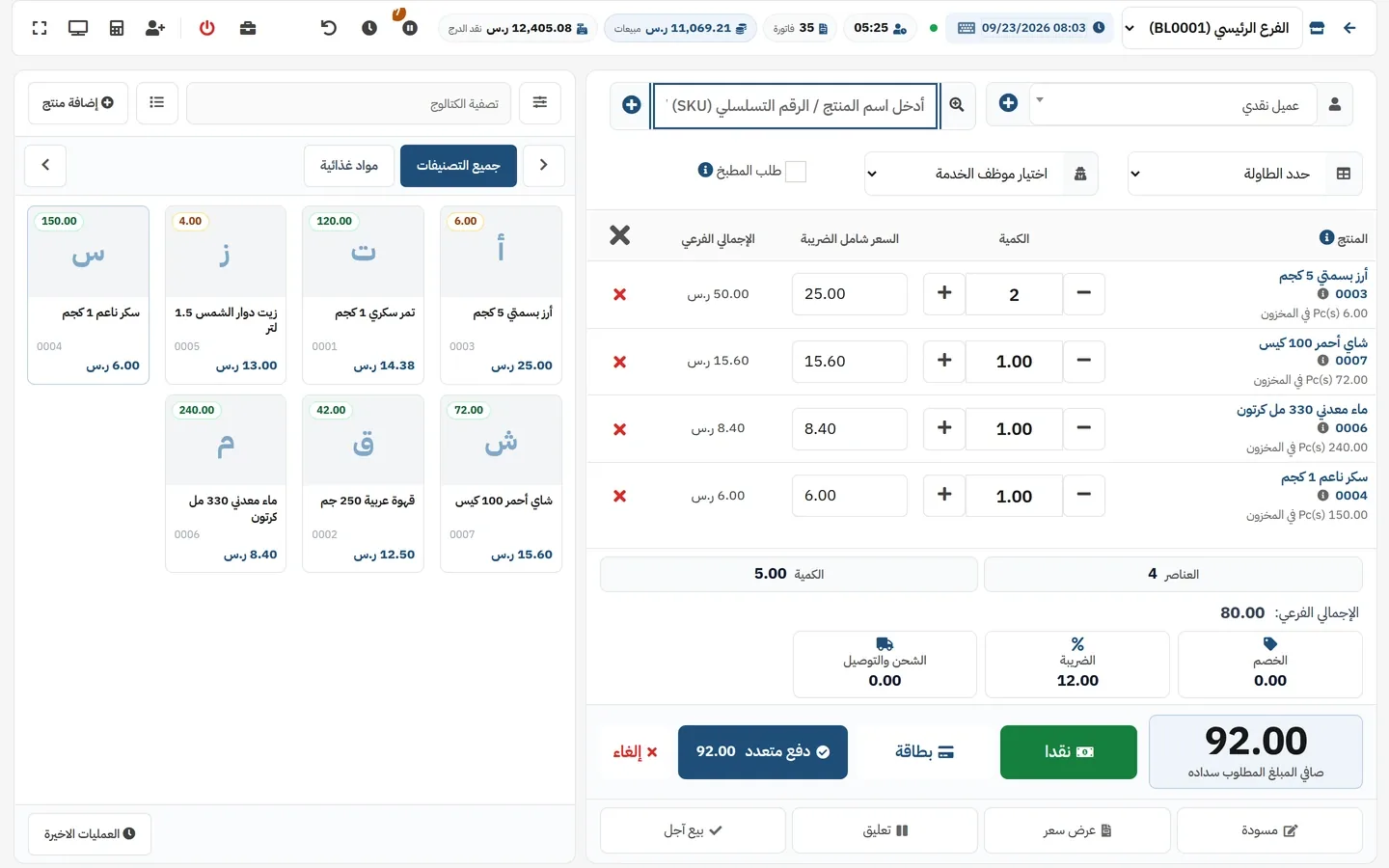
The AC POS selling screen with four items in the cart: 80.00 SAR subtotal, 12.00 SAR VAT and 92.00 SAR due, the cashier shift strip across the top (cash in drawer, sales, invoice count) and the product grid with live stock counts.

Numbers from inside the product

Unlimited Branches on the open plans, each with its own stock and invoice numbering
Double-entry Real accounting inside the system — not a billed add-on, not an integration
Phase Two E-invoicing with integration against the Fatoora platform
Included A documented API with keys you create and rotate yourself
155 Granular permissions, plus locking a user to specific branches
Arabic & English Full RTL interface, with the operational text written in Arabic first

Everything that runs your business — inside one system

Ten modules working on the same data: what you ring up at the till reaches stock, the ledger and the reports in the same moment.

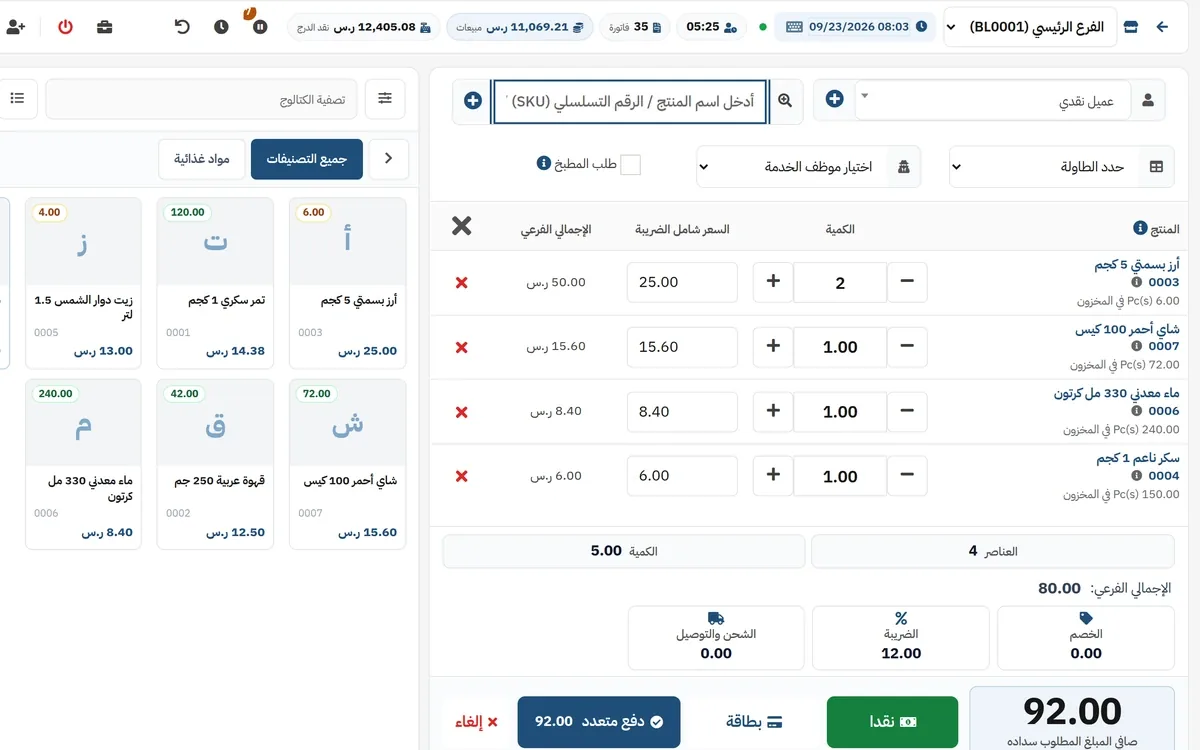
An open POS cart with four line items and quantity steppers, an 80.00 SAR subtotal, 12.00 SAR VAT, 92.00 SAR due, and cash / card / split-payment buttons.

Point of sale

A fast till by barcode, search or touch, with a cashier shift bar and a cash drawer.

  • Suspend a sale and resume it later — for queues and restaurant orders
  • Full or partial returns tied to the original invoice
  • Split payment across methods, plus seven custom payment types you name
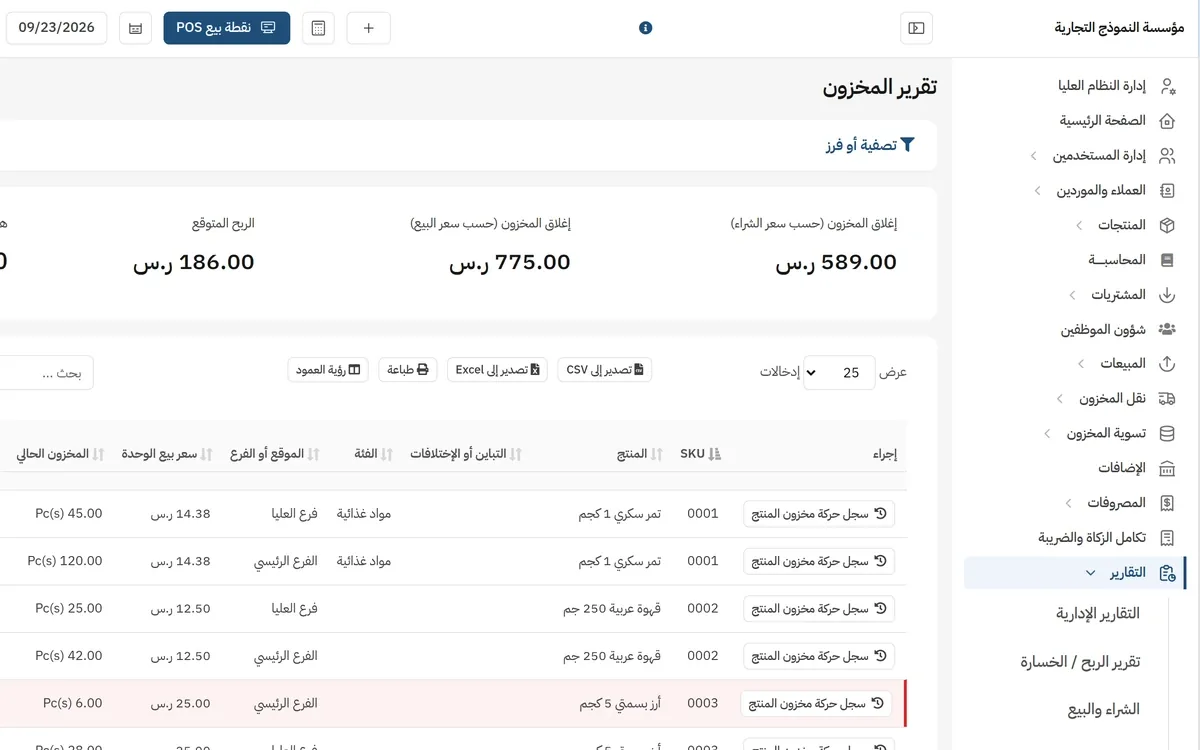
The stock report listing every item per branch — Main Branch and Olaya Branch — with current quantity and selling price, above closing-stock figures of 589.00 SAR at cost, 775.00 SAR at sale price and 186.00 SAR expected profit.

Inventory and branches

Live quantity of every item in every branch, with transfers, adjustments and stock takes.

  • Single, variable and combo products, with barcodes and printable labels
  • Lot numbers, expiry dates and serial numbers once enabled
  • A per-item alert threshold that surfaces on the dashboard
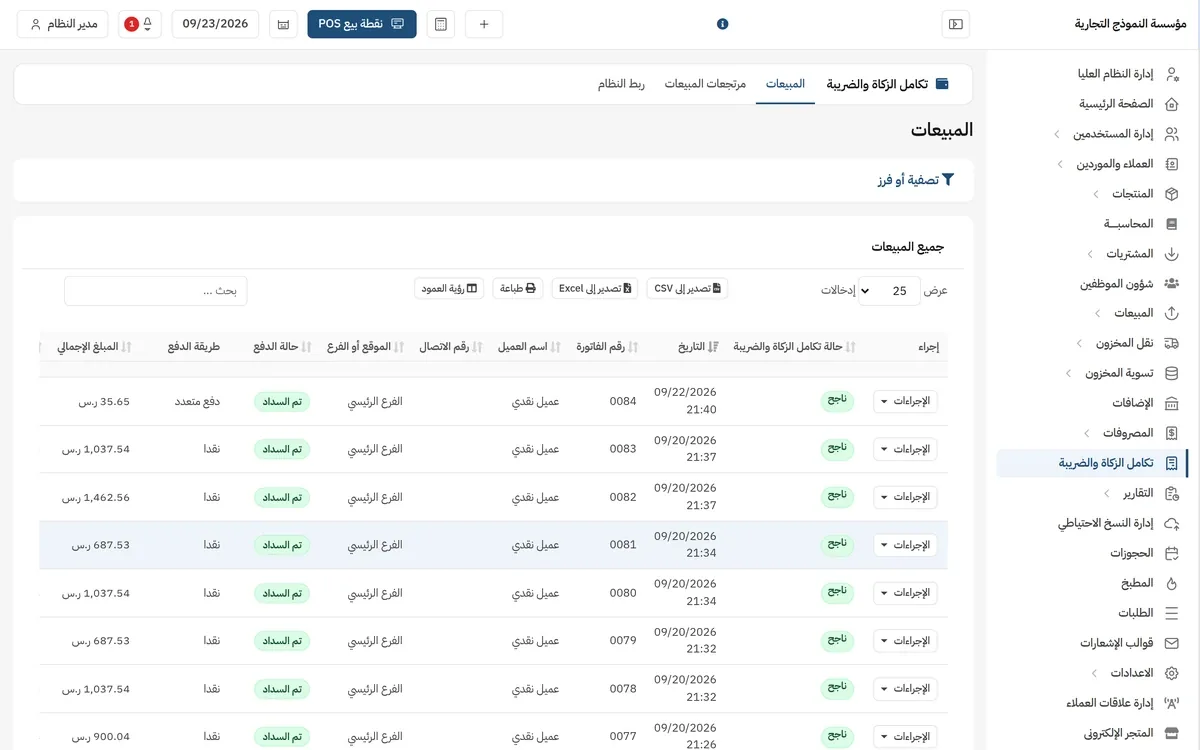
The e-invoicing sync board: the sales invoice list with each invoice's ZATCA integration status (Success), alongside invoice number, date, branch, payment method and amount.

E-invoicing (ZATCA)

A separate onboarding per branch, and every invoice sent down the right path: reporting for simplified, clearance for standard.

  • QR code, UBL 2.1 signature and a hash chain linking each invoice to the previous one
  • Automatic credit and debit notes for returns, carrying the original invoice reference
  • A sync board showing each invoice status and exactly why it failed
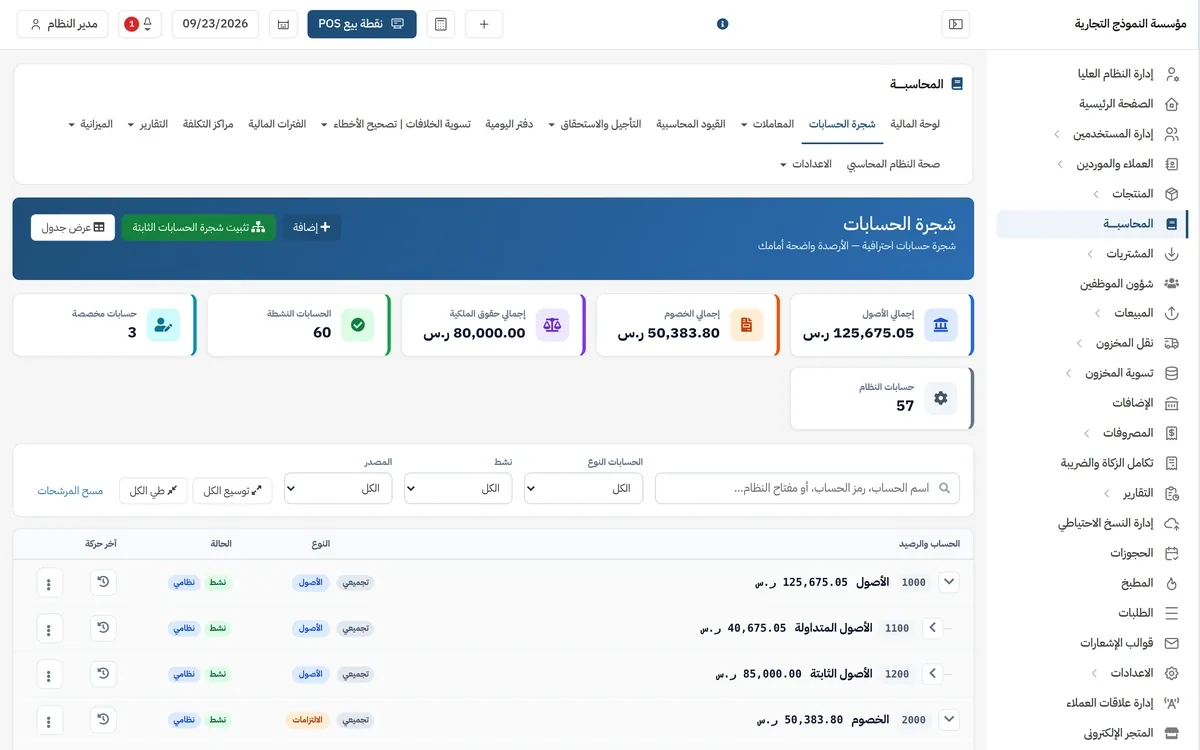
The chart of accounts in the accounting module: 125,675.05 SAR total assets, 50,383.80 SAR total liabilities, 80,000.00 SAR equity and 60 active accounts, over the top-level accounts with their balances and GL codes.

Accounting

A journal entry from every sale, purchase, expense and payment, and financial statements from the same system.

  • Chart of accounts, journals and manual entries under posting controls
  • Balance sheet, income statement, cash flow, trial balance and ageing
  • Fiscal years, budgets, cost centres and prepaid expenses
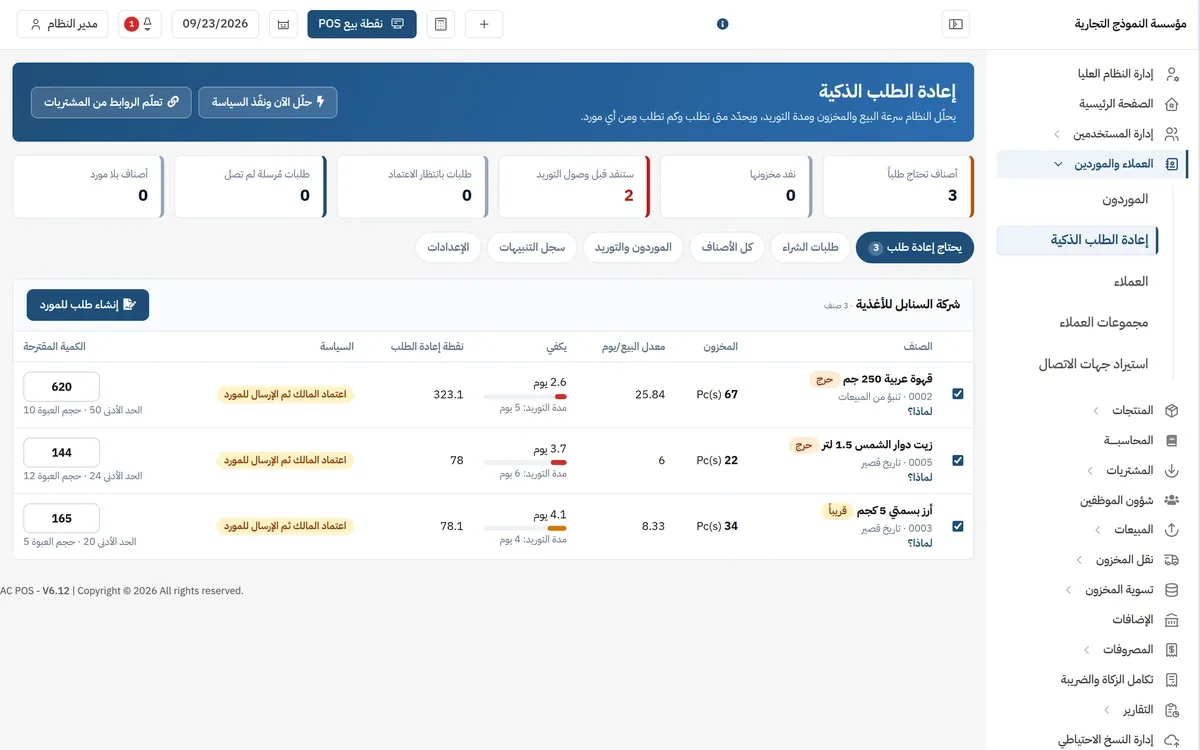
The smart replenishment screen: three items needing a purchase order grouped under their supplier, each with daily sales rate, lead time, reorder point, suggested quantity and a "Why?" link explaining the decision, under an owner-approval-then-send policy.

Purchasing and smart replenishment

The system works out when to order, how much and from which supplier — and writes out the "why" for each item.

  • Lead time, minimum order quantity and pack size per supplier, learned from your purchase history
  • Reorder point and safety stock from the actual sales rate
  • Four WhatsApp policies: off (the default), alert, approve, send directly
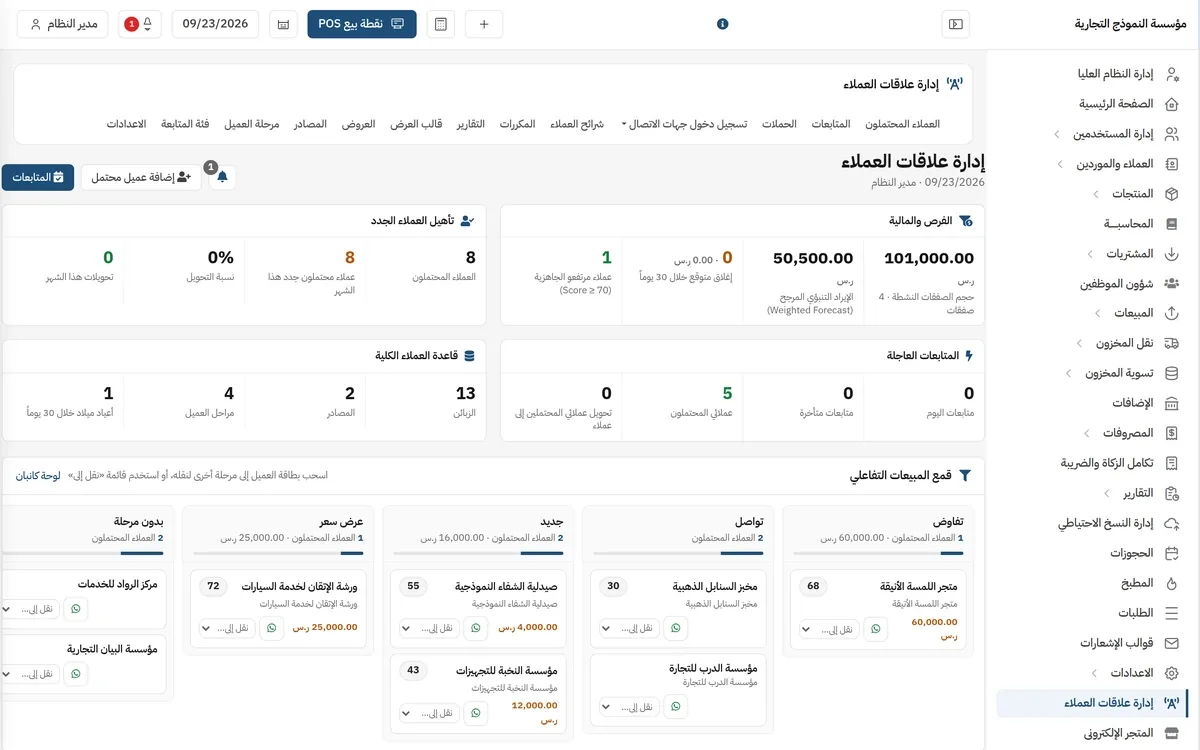
The CRM dashboard: lead, opportunity and urgent-follow-up indicators above an interactive sales funnel with negotiation, contact, new and quotation stages, and lead cards for sample businesses.

Customers and CRM

A customer book with balances and credit limits, and isolation that stops one branch seeing another branch's customers.

  • Leads, follow-ups, proposals and a call log
  • WhatsApp, SMS and email campaigns under server-enforced sending limits
  • A portal where the customer follows their own orders and account
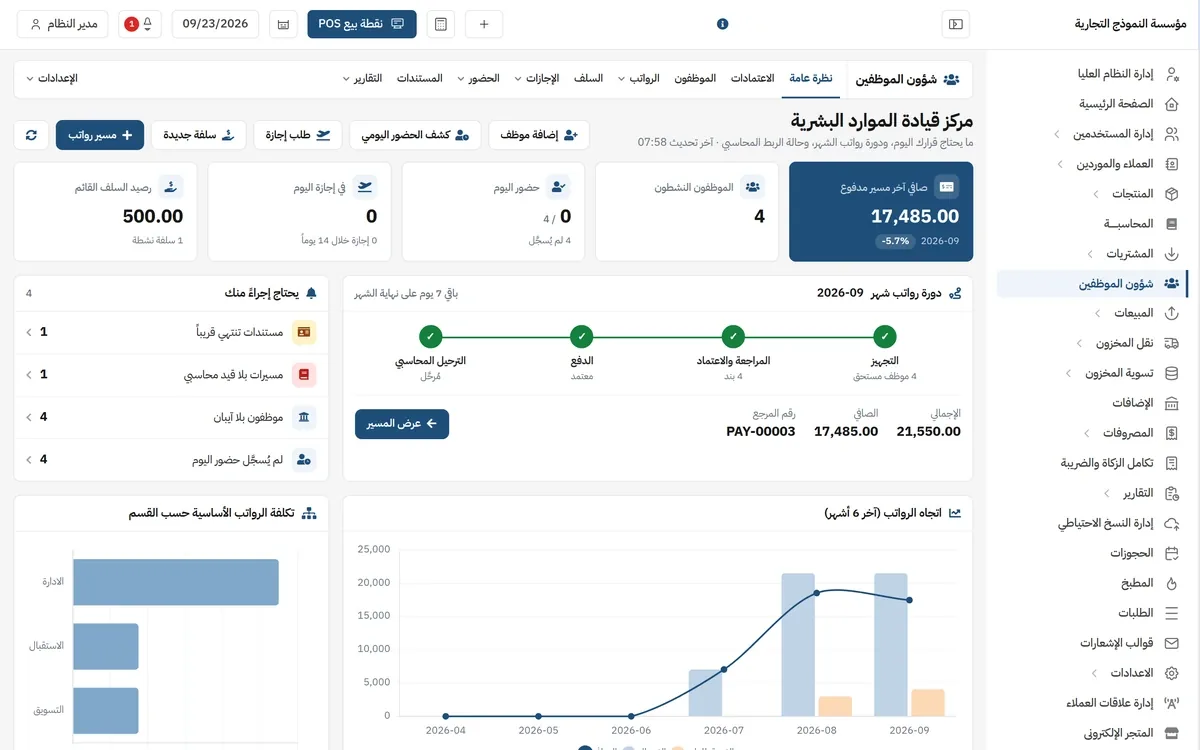
The HR command centre: 17,485.00 SAR net on the last paid payroll run, active-employee, attendance, leave and advances tiles, the month's payroll cycle with its prepare / review-and-approve / pay / post-to-ledger stages, and salary cost by department.

Human resources

Employee files, attendance, leave and payroll, with approving kept separate from paying.

  • Payroll runs with a payslip per employee and a configurable GOSI rate
  • Advances with instalments, settlements and a full movement log
  • Posting the payroll run to the books, plus cost by department
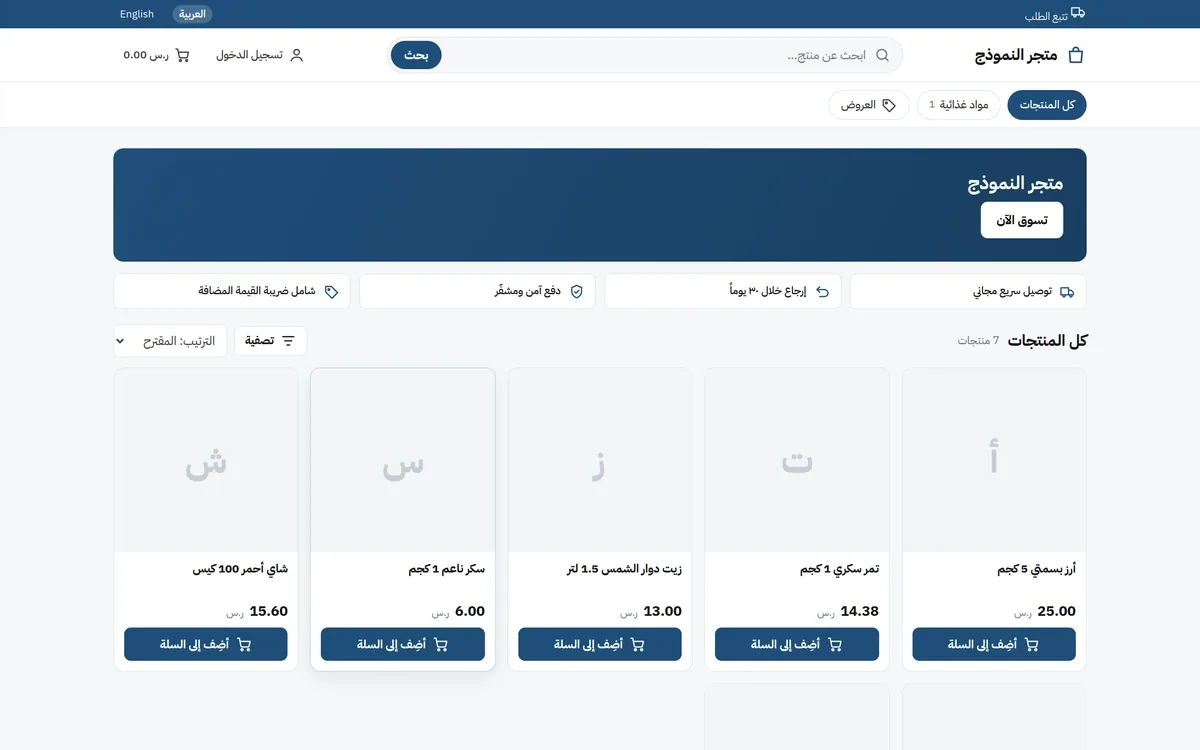
The Arabic storefront on the Nova template: search, cart and sign-in bar, store banner, service strips (delivery, returns, secure payment, VAT included) and a product grid with prices and add-to-cart buttons.

Online store

A ready storefront with four themes and your own domain — no second e-commerce subscription.

  • Cash on delivery, Geidea and Moyasar
  • Pages and sections you switch on and off, with SEO data per page
  • WhatsApp order notifications with per-message retry
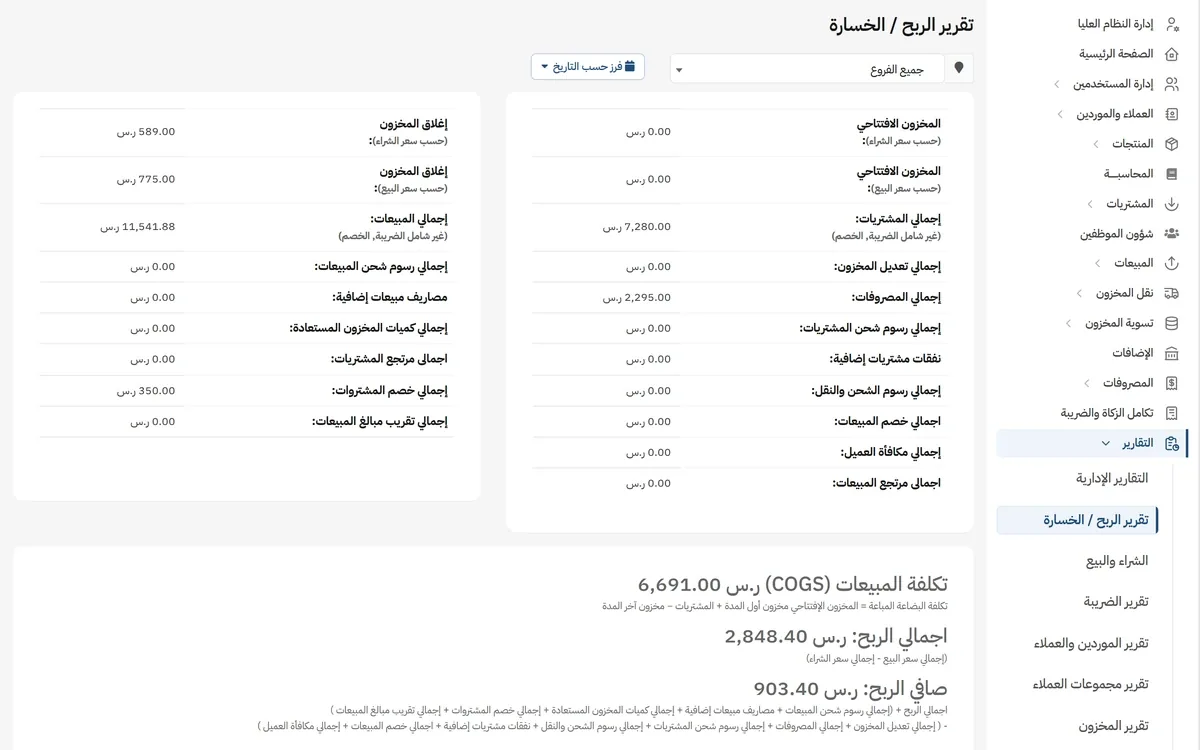
The profit and loss report: opening stock, purchases and expenses on one side, closing stock and 11,541.88 SAR total sales on the other, and below them 6,691.00 SAR cost of goods sold, 2,848.40 SAR gross profit and 903.40 SAR net profit.

Reports and analytics

A dashboard showing the period against the one before it, with a filter per branch.

  • Profit and loss, sales, purchases, trending products and sales agents
  • Stock, lot, expiry and item valuation reports
  • An activity log showing who did what and when
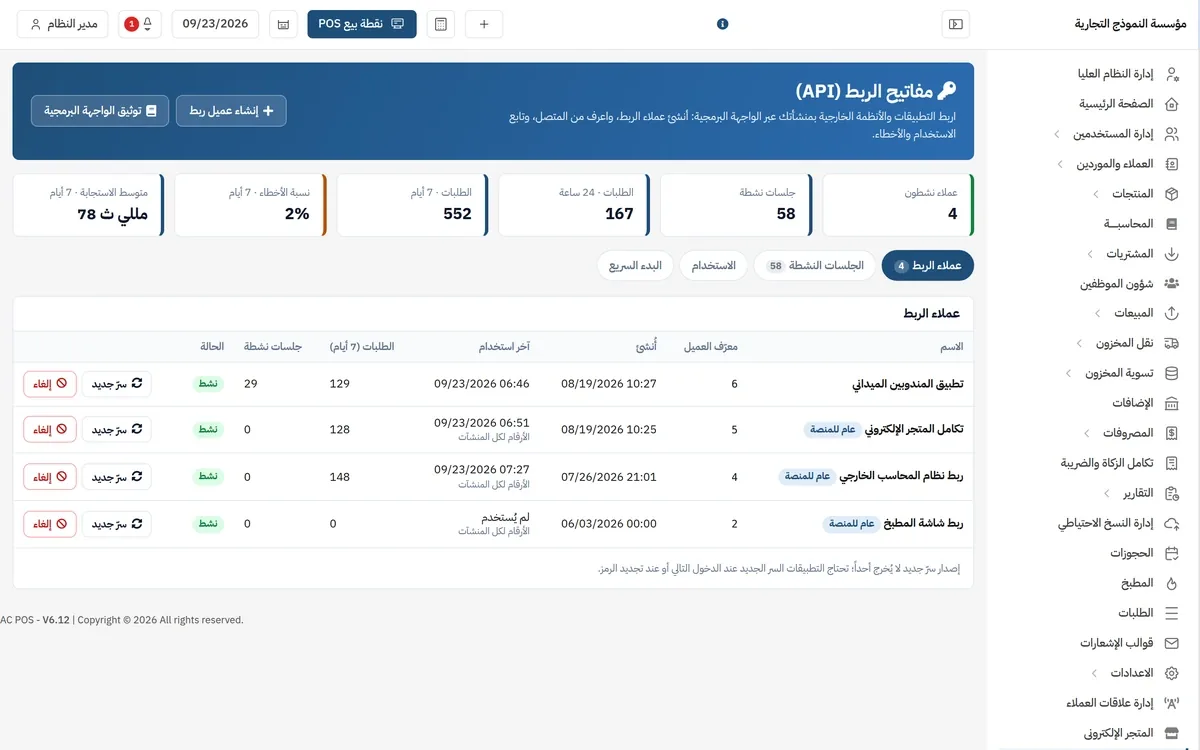
The API keys screen: active clients, sessions, 7-day and 24-hour request counts, a 2% error rate and a 78 ms average response time, over the client table with rotate-secret and revoke buttons.

API and integrations

A REST API with OAuth2, and keys you create and rotate yourself from inside the system.

  • Products, sales, returns, contacts, expenses, branches and cash registers
  • Reports over the API: stock, profit and loss, POS dashboard stats
  • Clock-in/out and field visits for the app you build yourself

E-invoicing Phase Two — what the system actually does

Saying "compliant" is cheap. These are the steps the system runs against the Fatoora platform, one by one.

Certificate onboarding per branch

Generate a private key and a signing request, take the OTP from the Fatoora portal, then a compliance certificate and a production certificate — per branch, with its own VAT number.

The right path per invoice type

A simplified invoice (B2C) is reported; a standard tax invoice (B2B) is cleared, and the file returned by the authority is stored.

QR, signature and hash chain

The XML is signed to UBL 2.1, the QR code is extracted and printed on the receipt, and each invoice is chained to the hash of the one before it.

Credit and debit notes

Sales returns are issued as credit notes carrying the original invoice reference and the reason for the return.

A status board with the reason for every failure

Total, synced, succeeded, failed and unsynced — plus the error code, its category and its message for each individual invoice.

You choose when it syncs

Immediately as the invoice is issued, daily at midnight, or paused so you sync by hand — with a start date you set.

The e-invoicing sync board: the sales invoice list with each invoice's ZATCA integration status (Success), alongside invoice number, date, branch, payment method and amount.

To be clear: the system issues invoices and sends them to the Fatoora platform, and gives you an accounting VAT report. It does not file your VAT return for you, and we do not claim to be an "accredited" ZATCA solution provider.

Is your business one of these?

The same modules, configured differently: turn on tables and the kitchen screen for restaurants, lots and expiry dates for pharmacies, price groups for wholesale.

  • Retail and shops
  • Restaurants and cafés
  • Grocery and convenience
  • Pharmacies
  • Workshops and car services
  • Salons and beauty centres
  • Wholesale and distribution
  • Services and offices

What you are not charged for

The difference between one system and another shows up on the monthly invoice, not on the feature list.

No per-user fee

The user count comes with the plan; no monthly amount is added for each member of staff you put on the system.

No per-branch fee

Branches are unlimited on the open plans — add one with its own stock, printer and invoice numbering at no extra cost.

The API is included

API keys are created from inside your own account on the plans that carry it, not behind a separate enterprise tier.

Accounting, HR and the store are in the subscription

They are first-party modules you enable from the add-ons screen, not marketplace apps billed on the side.

Security and data ownership

An owner with several branches asks one question: who can see what? Here is the answer.

Isolation on three levels

Company, then branch, then the record owner — enforced in one layer that governs every screen, so no branch sees another branch's customers.

155 granular permissions

Custom roles over fine-grained permissions, plus locking any user to specific branches.

A verification code at sign-up

Account activation by a code sent over email or SMS, with an expiry, an attempt limit and a cooldown.

Separate audit trails

A general activity log, an audit trail for the accounting books, and a third one for HR.

Backups in your hands

Create a full backup and download it from inside the system whenever you want, and export your reports and lists to files.

Locked once synced

An invoice sent to the Fatoora platform can no longer be edited or deleted, and posting controls protect the accounts the engine manages.

A published price, with no contact form

These are the plans available right now, read straight out of the system.

سوق الكتروني

300 ر.س per month

سوق الكتروني سحابي

  • 1 branch
  • 1 user
  • 275 products
  • 300 invoices
Includes
  • Connector Module
  • Crm Module
  • E-commerce Module
  • WooCommerce Module
Subscribe now

الباقة الاحترافية الشهرية

99 ر.س per month

إدارة متكاملة للمبيعات والعملاء والمخزون والمصروفات والفروع والموظفين والمحاسبة.

  • Unlimited branches
  • 25 users
  • Unlimited products
  • Unlimited invoices
Includes
  • Accounting
  • Crm Module
  • E-commerce Module
  • HRM
  • WooCommerce Module
  • Zatca
Subscribe now

باقة الأعمال الشهرية

199 ر.س per month

حل متكامل للشركات متعددة الفروع مع المحاسبة والموارد البشرية والمتجر والتقارير والصلاحيات المتقدمة.

  • Unlimited branches
  • Unlimited users
  • Unlimited products
  • Unlimited invoices
Includes
  • Accounting
  • Connector Module
  • Crm Module
  • E-commerce Module
  • HRM
  • WooCommerce Module
  • Zatca
Subscribe now

الباقة الأساسية

790 ر.س per year

إدارة المبيعات والعملاء والمخزون والمصروفات والفروع بسهولة.

  • 1 branch
  • 2 users
  • Unlimited products
  • Unlimited invoices
Includes
  • Accounting
  • Crm Module
  • E-commerce Module
  • HRM
  • Zatca
Subscribe now

الباقة الاحترافية السنوية

1,490 ر.س per year

إدارة متكاملة للمبيعات والمخزون والعملاء والمحاسبة والموظفين والمتجر.

  • Unlimited branches
  • Unlimited users
  • Unlimited products
  • Unlimited invoices
Includes
  • Accounting
  • Crm Module
  • E-commerce Module
  • HRM
  • WooCommerce Module
  • Zatca
Subscribe now

باقة الأعمال السنوية

2,990 ر.س per year

حل متكامل للشركات متعددة الفروع مع المحاسبة والموارد البشرية والمتجر والتقارير والصلاحيات وواجهات API.

  • Unlimited branches
  • Unlimited users
  • Unlimited products
  • Unlimited invoices
Includes
  • Accounting
  • Connector Module
  • Crm Module
  • E-commerce Module
  • HRM
  • WooCommerce Module
  • Zatca
Subscribe now

Prices exclude VAT.

A 14 days free trial on every paid plan.

All plan details and the comparison

Questions before you decide

Six questions every buyer asks — answered as they are, not as we wish they were.

Does it support more than one branch?

Yes, and branches are unlimited on the open plans. Each branch has its own stock, printer, invoice numbering scheme and its own ZATCA onboarding, and you can lock any user to one branch or several so they never see the rest. Dashboard reports filter by branch or show the whole business.

How do I move my data across?

By file import: products, opening stock, sales, and the customer and supplier book — each has its own import screen with a ready template. The sales import shows a preview before it runs, and a whole import batch can be reverted if the result is not what you expected.

What hardware do I need?

Any device with a modern browser: a desktop, a laptop, a tablet or a phone. The till screen is built for touch and works on a tablet. Standard receipt printers and barcode scanners are supported. There is no app to download from an app store — the interface itself runs in the browser, and anyone who wants their own app builds it on top of the API.

Does it work offline?

No. The system needs an internet connection, and it has no offline mode that stores invoices locally and syncs them later. The till screen watches the connection and shows a clear warning when it drops, advising you not to complete the payment until it is back. We say so plainly so you do not find out during your first outage.

Who owns the data?

You do. Your business data is isolated from every other business on the platform, and at any time you can create a full backup and download it from inside the system, and export your reports and lists to files. What we collect and how we store it is set out in the privacy policy.

How do I cancel?

A subscription runs for a fixed term and ends with it; no contract obliges you to carry on — you simply do not renew. Before the term ends you can download a full backup and export your reports. Refund terms within a paid term are set out in the refund policy.

Start today, and decide after you have tried it

Create your account and try the system on your own data. If you would rather we pointed you at the right plan, message us on WhatsApp or give us a call.

or call us +966 53 592 9058